
We just released a new version of GotCGM that has various bugfixes and a new Surface menu page calling attention to the Siri functionality on iOS: “Hey Siri, what’s my blood sugar in GotCGM” (that worked before but we didn’t have a page telling you it worked. You can also see the Gluroo Documentation for adding a Siri shortcut to check your blood sugar.
For Android, this release has two new features available in the Surfaces menu:
- Always-on CGM Display: Enabling this will require that you grant the permission “Alway display over other apps” to GotCGM. Once that permission is enabled and the surface configuration page is re-visited, you’ll see controls that look like the below. Start by selecting a position — we really like “Top” bot you should try the others, too, and experiment with the other settings to get the look and location that you prefer.
- Lock Screen & Status Bar: Enabling this turns on a special “Live Update” notification that automatically stays expanded on your Android Lock Screen. It may also display specially in the notification status bar. That status-bar feature is finicky as it depends a lot on how your Android system chooses to display the notification based on how much you use the GotCGM app vs other apps, how many other notifications are visible, and plenty of other things. We recommend using this feature for the Lock Screen and using the Always-on CGM Display for showing your blood sugar all the time in the status bar or elsewhere on the screen.
You can see the new Always-on CGM Display in action at the @Gluroo YouTube channel video
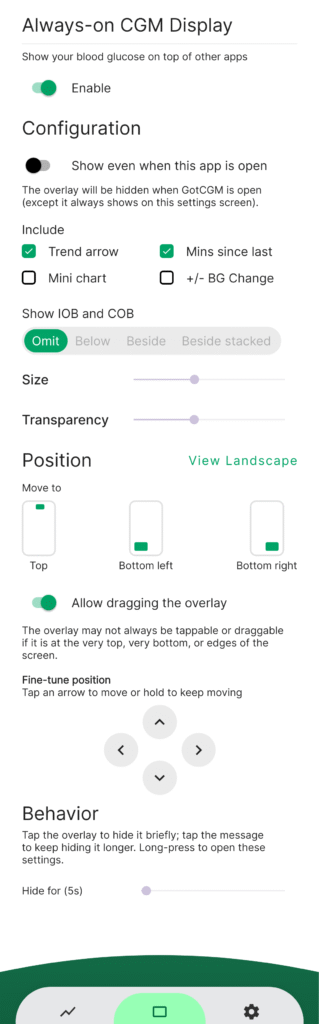
Above are the configuration controls for the Android Always-on CGM Display.
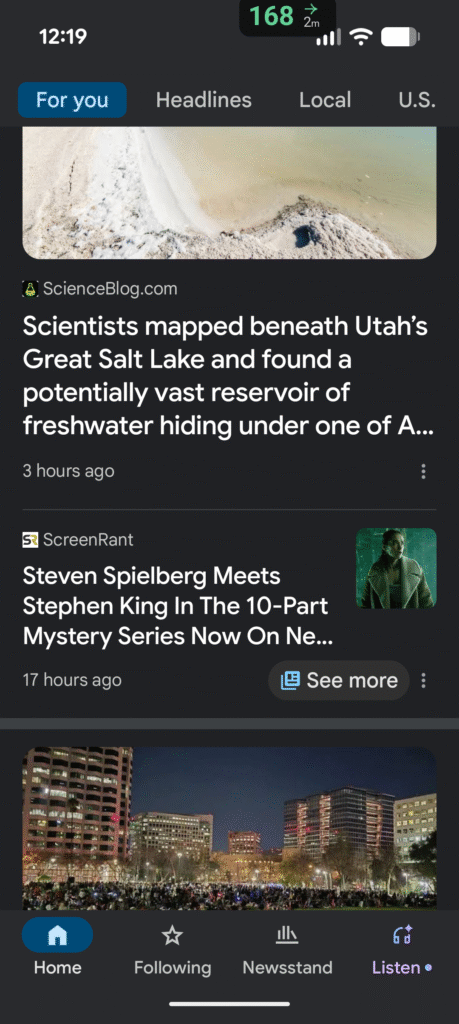
Above is how the GotCGM Always-on CGM Display shows on the top of the screen, even while, say, the Google News app is open (and any other app).
Got an iPhone?
If you’re on and iPhone (or any iOS device), the Always-on CGM Display in GotCGM for iPhones uses the native Live Activity functionality and shows on your lock screen all the time and on either/both sides of your dynamic island for supported phones. The Gluroo documentation about CGM Blood Sugar display on iPhone Everywhere has more information about that.
Using Gluroo?
Gluroo generally contains a superset of GotCGM functionality and these features will be coming to the next release of Gluroo, too!